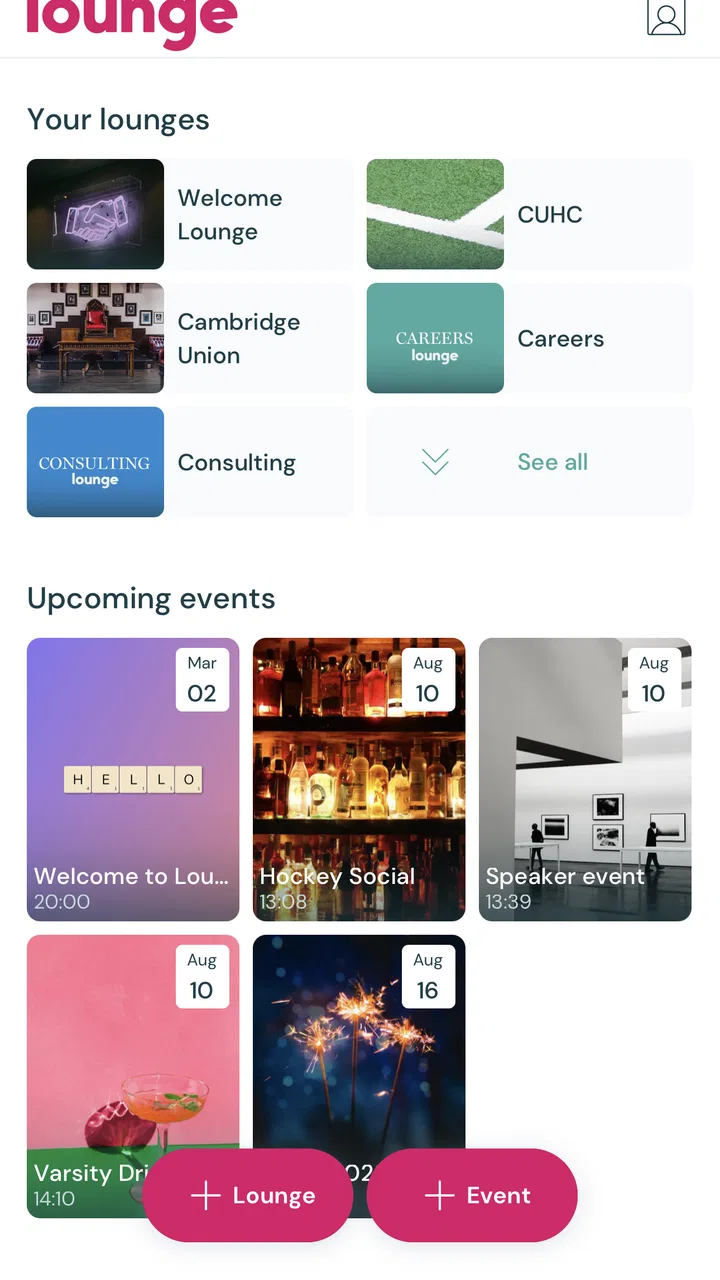
Lounge - Groups & Events
- 0.0
- Rating
- 10.00K
- Installs
- Free
- Price

 Analysis by App-foxy
When I’m deciding whether a group needs its own app, I start with a practical question: what keeps going wrong in the current setup? If plans disappear into personal chats, people mix up which gathering a message belongs to, or quieter members struggle to catch up, a dedicated space may help. If everyone already finds the existing chat easy to use, adding another destination may only create extra checking. That distinction is central to whether Lounge is worth trying.
I approached Lounge as a focused way to keep groups and events together without turning every interaction into an endless stream of unrelated updates. That narrow purpose is also its clearest identity. Lounge Technology has built this free Events app around the idea that a group should feel like a shared space for a specific activity, rather than another noisy social feed. In my experience, that makes it appealing for people who organize recurring meetups, coordinate plans with friends, or want event conversations to stay separate from their everyday messaging.
My overall view is positive but measured: Lounge works best when the group itself has a clear reason to exist. It is not the app I would choose for broad social networking, detailed project management, or a large public event operation. Its value comes from reducing distractions and giving a particular gathering or community a more contained home. That focus can feel refreshing, although it also means users looking for a long list of advanced tools may find the experience too limited.
You May Also Like

 Blood Strike: 2.5 Anniversary
Blood Strike’s Loadouts Turn Every Drop Into a Tactical Gamble
A close look at Blood Strike’s custom loadouts: how fast access to signature weapons reshapes its battle royale rhythm, rewards preparation, and narrows the gap between fights.

 Pandora - Music & Podcasts
Pandora’s Music Is Easy to Start, but Harder to Recover
Pandora’s strength is its low-effort path from a seed to a station. Its weak spot is how much confidence it asks you to place in connection, setup, and quiet recovery.

 8 Ball Pool
 Is Built on Rivalries, Rematches, and Routine
A close look at the rivalries, rematches, shared routines, and unanswered safety questions that turn a quick pool match into a persistent mobile community.

 Samsung Music
’s Quiet Strength Is Playing What You Already Own
Its reach comes less from spectacle than from dependable access to a personal library. That simplicity is both the app’s strongest retention engine and its ceiling.

 AccuWeather: Weather Radar
AccuWeather Review: A Quick, Clear Forecast for Everyday Decisions
For everyday plans, the best forecast is the one you can understand quickly. AccuWeather makes rain timing, radar, and local conditions easy to act on, with a few trade-offs.

 Hill Climb Racing
Why Hill Climb Racing Still Turns Crashes Into One More Run
A tiny car, a bumpy hill and one more upgrade: Hill Climb Racing keeps resurfacing because its simple chaos makes every near-miss feel personal.
More From Our News Desk
View All News


What using Lounge feels like in everyday group planning
The first thing I noticed is how different the concept feels from relying on a general-purpose chat app. In a typical messaging service, an event conversation quickly gets mixed with jokes, forwarded posts, private replies, and unrelated announcements. Lounge is easier to understand when I treat each group as a dedicated room for a shared purpose. A weekend hiking group, a neighborhood book club, or a small volunteer team can have its own place without competing with everything else happening in my phone.
That separation is especially useful when plans change. Imagine a group of friends arranging a monthly dinner. In a normal chat, the original date may be buried under weeks of conversation. With a space centered on that group or event, I can return to the relevant context instead of searching through an entire personal inbox. The benefit is not dramatic automation; it is the quieter advantage of keeping the right conversation in the right place.
The app’s store summary describes the experience as groups and events without distractions, and that is a fair way to understand its personality. I would not install it expecting a replacement for every communication tool I use. I would install it when I want a cleaner boundary around a shared activity. That distinction matters because the app becomes more useful as the purpose of the group becomes more specific.
Lounge is developed by Lounge Technology and is available at no cost. It is listed for a Teen audience, which is worth keeping in mind when deciding whether it fits a family, school, or community setting. The current version is 32.5.0, and the app supports devices running Android 8.0 or later. Those details make it accessible to many existing Android users, although anyone with an older phone should check compatibility before planning a group around it.
A calmer alternative to ordinary messaging
The strongest case for Lounge is not that it can do everything better than a messaging app. It is that it encourages a different habit. Instead of asking one crowded chat to handle invitations, reminders, updates, and casual conversation, I can give a defined group its own context. That makes it easier for a new member to understand what the space is for and easier for existing members to return after a break.
I also see a practical advantage for people who participate in several recurring activities. A person might belong to a running group, a community theater cast, and a board-game circle. Keeping those activities distinct reduces the chance of sending the wrong message to the wrong people or missing an important update because several conversations overlap. The app’s focused approach is most convincing in exactly this kind of situation.
There is a trade-off, however. A general messaging platform often wins through familiarity. Friends and colleagues may already have accounts, notifications configured, and established habits there. Moving a group to Lounge requires everyone to accept one more place to check. The app can make organization cleaner, but it cannot remove the social friction of convincing a group to change its routine.
Useful workflows for real groups
One good way to use Lounge is to create a space around the event rather than around an individual conversation. For a class reunion, for example, the group can remain useful before the date, during the gathering, and afterward when people share follow-up details. This is more durable than opening a temporary chat that becomes difficult to identify later. The same approach works for a recurring club where the members stay broadly consistent but the individual meetings change.
A second useful workflow is to treat the app as a filter for attention. I would avoid adding every possible discussion to the same group. Instead, I would keep the space tied to decisions and information that affect the event. This is a small but important discipline: the app’s low-distraction character depends partly on how the group is managed. If members turn it into a general social feed, the advantage becomes less noticeable.
A third insight is that Lounge may be more valuable for occasional participants than for the most active organizers. Organizers often remember plans because they created them, while attendees need a clear place to return to. A focused event space can reduce the mental effort required from someone who does not read every message or participate every day. For that reason, I would consider it for groups with uneven levels of involvement, not only for highly active communities.
For recurring events, I would also establish a simple naming and posting routine from the beginning. A group should make its purpose obvious, and important updates should be written clearly rather than hidden inside casual conversation. Lounge’s focused design helps, but it is not a substitute for good organization. The best results come when the person managing the group treats it as a dependable reference point instead of another place for spontaneous chatter.
A useful test before inviting everyone is to decide what belongs in the space and what should remain in ordinary conversation. For a volunteer group, the Lounge space might be reserved for meet-up details and changes that affect participation, while personal catch-ups stay elsewhere. This boundary prevents duplication and gives members a reason to check the dedicated space. It also makes the first week easier: people can quickly learn what to expect rather than wondering whether every casual exchange has moved.
There is a related trade-off for organizers who handle several events. A separate group for each stable activity can keep context tidy, but too many spaces may recreate the very clutter the app is meant to avoid. I would start with the one group that causes the most confusion, see whether members actually return to it, and only then consider expanding the arrangement. That gradual approach is less disruptive than asking everyone to migrate every conversation at once.
Where the focused design starts to feel restrictive
The same simplicity that makes Lounge approachable can become a limitation for complex planning. If I were coordinating a conference, managing multiple workstreams, assigning responsibilities, or tracking deadlines, I would probably choose a dedicated project or event-management tool. Those services are designed around schedules, task ownership, documents, and structured follow-up. Lounge makes more sense when the human group matters more than the administrative machinery.
I would also hesitate to use it as the only channel for something that requires formal records or carefully controlled communication. A casual community event and a professional operation do not have the same needs. When the cost of missing a detail is high, I prefer tools with clearly visible calendars, task systems, or established organizational controls. Lounge’s appeal is its lightness, and lightness is not always appropriate.
Another point to consider is engagement. A distraction-free space sounds attractive, but fewer distractions can also mean fewer reasons for members to open the app. If a group only meets rarely and does not post between events, participants may forget to check it. I would solve that by agreeing on when the group will be used and by keeping important updates timely. Without that shared expectation, any specialized group app can become another dormant icon.
The rating shown for Lounge is currently 0.0, while the app has passed the ten-thousand-install mark. I would read those figures cautiously rather than treating either one as a complete verdict. The install count suggests that the concept has reached a meaningful audience, but the rating does not give me a useful basis for judging satisfaction. My own assessment therefore rests more on the product’s focused purpose and the situations where that purpose genuinely helps.
That is also why I would avoid judging it solely by whether it has the same breadth as a large social network. A broad platform is usually better when a group needs public discovery or wants to reach people beyond an existing circle. Lounge’s appeal is narrower: it is for people who already know the shared purpose and want a more contained place to coordinate around it. The choice is less about which tool is universally stronger and more about whether the group needs reach or focus.
Who should try it, and who should skip it
I think Lounge is a good fit for small or medium-sized groups that need a dedicated place for an activity but do not want a full project-management system. It could suit hobby circles, informal clubs, local meetups, recurring social plans, and communities where the main challenge is keeping event-related conversation together. It is also worth considering for people who find large social platforms exhausting and want a more intentional environment.
I would recommend trying it when your current problem is clutter. If members regularly ask questions that were already answered, lose track of the event context, or confuse several group chats, a dedicated space may improve the routine. The app is particularly attractive when the group has a stable identity but does not need elaborate administration.
On the other hand, I would skip Lounge if your group already communicates comfortably in an established service and has no real problem with organization. Installing a new app simply because it sounds cleaner may create more work than it removes. I would also look elsewhere for large-scale public events, formal business coordination, detailed scheduling, or situations requiring a deep set of specialized controls.
Parents and organizers should pay attention to the Teen content rating when deciding whether the app is appropriate for younger users or a supervised setting. That does not automatically make it unsuitable for a particular group, but it is a useful part of the decision rather than a detail to overlook. Likewise, the Android requirement matters for anyone using an older device, especially in a group where not everyone upgrades phones regularly.
For someone weighing Lounge against a calendar, the deciding factor is whether the main need is a shared conversation or a precise schedule. A calendar is more suitable when the important outcome is seeing dates and availability at a glance. A dedicated group space is more appealing when members need a continuing place for context around an activity. In practice, the two approaches can complement each other, but I would avoid expecting a group app to replace a calendar when dates are the core problem.
It is also worth asking how many members are likely to participate. A small circle that already agrees on where to communicate may not gain much from switching. A group with new or occasional attendees may benefit more from having one clearly named home for its purpose. Before making the move, I would ask a few less-active members whether they would remember to check a separate app; their answer may be a better predictor of success than the enthusiasm of the organizer.
My verdict after weighing the trade-offs
Lounge succeeds because it does not appear to chase every possible use case. Its strongest quality is the attempt to give groups and events a more deliberate home, away from the constant interruptions associated with broad social platforms and busy messaging threads. When I imagine using it for a recurring club or a focused gathering, the concept feels sensible and easy to explain to other members.
Its weakness is equally clear: the app’s focused approach may not be enough for users who expect advanced coordination tools, and adoption depends on the group agreeing to use another service. That is not a minor issue. A well-designed space is only useful if the people involved remember to visit it and understand what belongs there.
For me, Lounge is best viewed as a practical middle ground. It is more intentional than a casual group chat, but less demanding than a full event-management platform. I would recommend it to someone who wants a dedicated, low-noise place for a real group purpose and is willing to establish a simple shared routine. I would not recommend it as a universal communication replacement.
After considering its audience, limitations, and everyday usefulness, I see Lounge as a worthwhile free option for focused communities rather than a must-have app for everyone. If your group’s biggest problem is distraction and scattered event conversation, it deserves a trial. If your biggest problem is complex scheduling, accountability, or formal coordination, another category of tool will serve you better.
FAQs for Lounge - Groups & Events
01What is Lounge - Groups & Events?
Lounge - Groups & Events is a social networking app designed to help users create and join groups based on shared interests. It offers a platform for organizing events, fostering community engagement, and connecting with like-minded individuals. Available for both Android and iOS, it aims to simplify event planning and group interactions.
02How does the app handle user privacy and data security?
Lounge - Groups & Events takes user privacy and data security seriously. It employs encryption to protect user data and provides customizable privacy settings, allowing users to control who can see their information and activities. Regular updates and compliance with data protection regulations ensure a secure user experience.
03Is the app free to use, and are there in-app purchases?
Yes, Lounge - Groups & Events is free to download and use. However, it offers in-app purchases for premium features, such as advanced event planning tools and enhanced group management options. These purchases are optional and designed to enhance the user experience without limiting basic functionalities.
04Can I use Lounge - Groups & Events for professional networking?
While primarily designed for social interactions, Lounge - Groups & Events can be adapted for professional networking. Users can create groups focused on industry-specific discussions, business events, and professional interests, facilitating connections and collaborations within a professional context.
05How do I get started with creating a group or event?
To create a group or event, simply download the app, register an account, and navigate to the 'Create' section. From there, you can set up a new group or event by filling in details like name, description, date, and location. The app provides easy-to-follow prompts to guide you through the process.
Pros
- User-friendly interface enhances navigation.
- Wide variety of groups to join.
- Event creation is straightforward.
- Real-time notifications keep you updated.
- Excellent privacy settings for users.
Cons
- Limited customization for group pages.
- Occasional glitches in event calendar.
- Requires internet connection to function.
- Ads can be somewhat intrusive.
- Some features locked behind paywall.

Lounge - Groups & Events
Gallery